
Design process with development in mind

Off to a good start
Every project is at least a little bit different and as a freelance designer without your own in-house development team, you often have to adjust to whoever you’re working with. It’s a really good idea to ask some questions before you even start doing any work. Questions such as:
- How would you prefer that the handout is delivered?
- Is there any specific framework you’ll be using in development?
- Are there any limitations within the development environment?
Usually, knowing answers to these questions will help you, the designer, too. For example, I am using Figma for most of my projects, however if the developer that I’m working with is much more used to using Adobe XD or Invision studio when handling design assets, I may save some time and effort for myself and start creating the design in one of those tools. Or, if we can’t find a common ground, find an easiest solution that works for both of us.
If the developer is using a front-end framework in the development process, then you can prepare your design files to be more suitable for that framework. That can, again, save you some time and energy, and will definitely speed up the overall process. If you’re new at design and you’re thinking “What on Earth is a front-end framework?”, trust me - most popular frameworks have a lot of templates and explanations of their grid systems at their websites.
“Asking these questions may be daunting, but ultimately it saves you a lot of time and effort if you know answers to them.”
This can be a bit daunting at the very beginning of your career, however in my opinion, it’s better to ask these questions sooner rather than later. It will give you much more time to research what’s the best way to prepare design for some of these systems, and will save you time in the end if the developer asks for revisions.
Preparing the design file
With that information in mind, you can start preparing your file. How and when in the design process you’re going to do some of these steps is fully up to you, but in the end, you should include them somewhere in your design file:
- Grids. Depending on your wishes and also the framework/web builder that will be used, these may vary, but most popular grids for website design usually include 12 columns and 10px baseline grid, however 8px and 4px baseline grid can also often be used.
- More grids. If the design is responsive (as it should be these days), you’ll want to provide grid systems for tablet/mobile versions of the website as well.
- Break points. Somewhat related to grids, it’s usually a good idea to be aware at what point(s) should your design go into a tablet/mobile version, and mark those points to make it clear for the developer as well.
- Typography style guides. Try to use common web builder phrases such as headline 1, headline 2, body, caption…
- Library of icons, photographs and other reusable components, all at one place so they can easily be found.
- Documentation on how those components behave in different environments, all in easily accessible place as well.
Let's show some examples
Typography
Any UI design tool allows you to save some style guides one way or another, so use that to your own advantage. However, to make the developers job easier, I also like to do this separate page that lists all of the typography styles and where to use them.
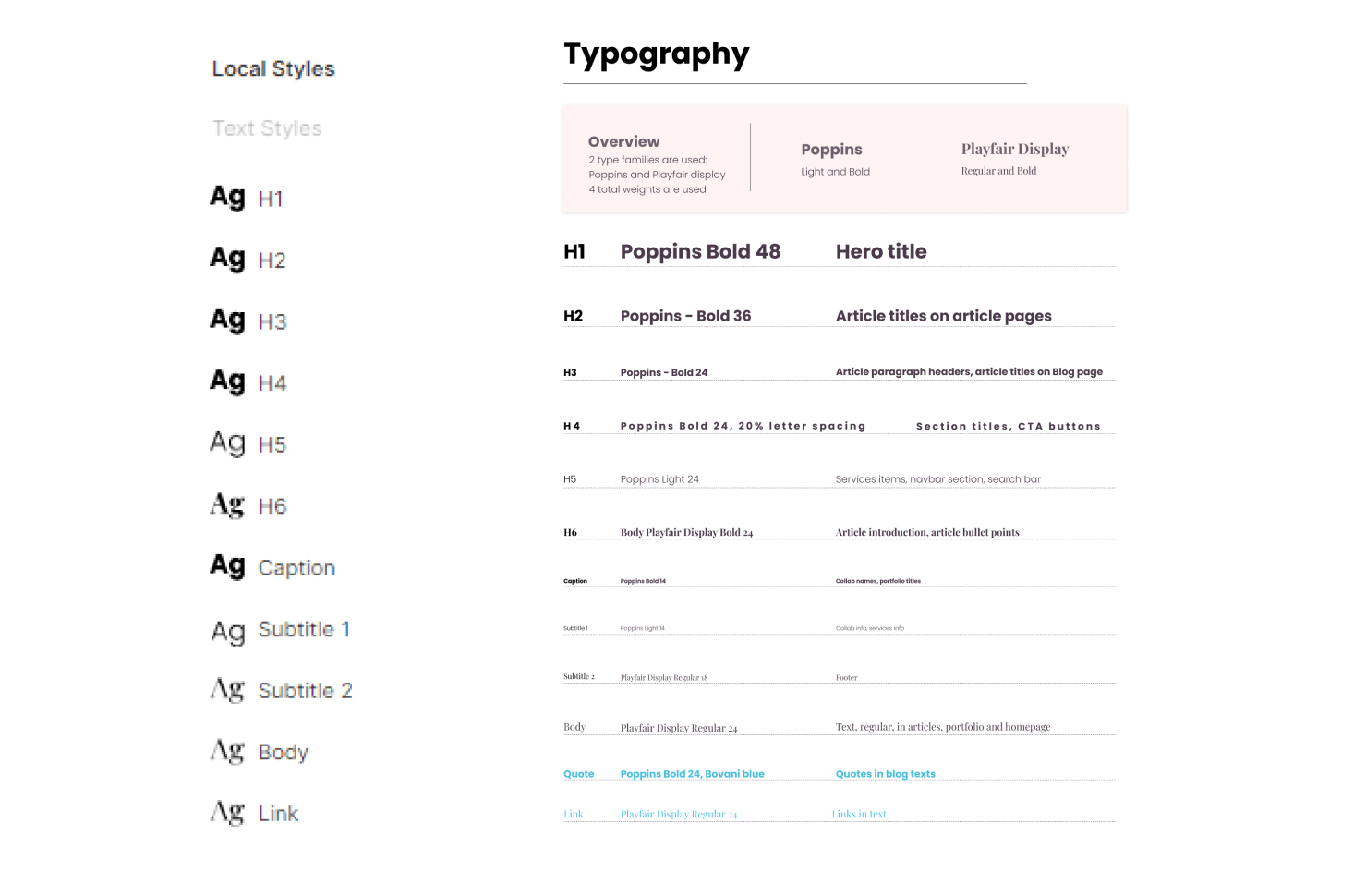
To prepare typography styles well for the development, it's important to use the common phrases or categories those styles typically fall into (H1, H2... through H6 or H7, Caption, Body, Button, Link, Subtitle... can depend on framework).
Behavior
Any good design includes some elements of UI behavior - or different states of various objects, depending on the interaction or responsiveness. This can be explained in various different ways - most commonly by either text or prototype.
In some of my first projects, I’d fail to properly explain these things to the developer. For example, I would create two frames: homepage 1 and homepage 2, where homepage 2 would have one thing changed, and I would think it’s clear enough that this behavior happens as a person is hovering over that element (because i named that element: hover).
Looking at that from a perspective of someone who has not been involved in my mind process while making the design, it’s incredibly difficult to notice that small difference between two artboards. So, don’t take things like that for granted and simplify them however you can.
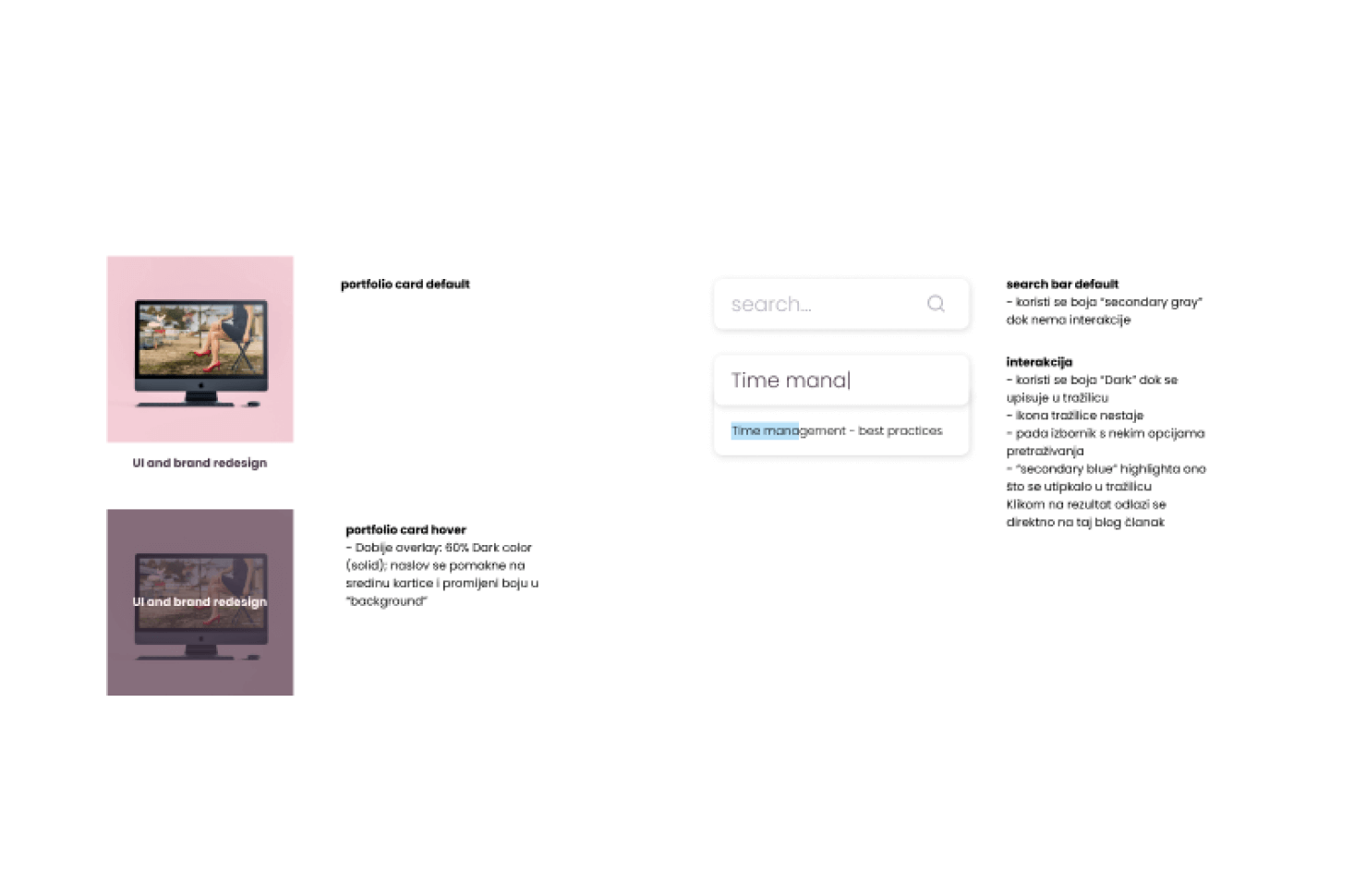
These things would be the starting point on how to prepare your designs for development. I am, for one, excited to learn more about this topic as I'm continuing to work as a freelance designer, and I hope to be able to share more of my advice in the future.
How about you? I'd be more than happy to read your own tips - or just thoughts about the ones I've shown. The designer-developer relationships have more room to grow and the more information we share, the better we can prepare ourselves for our future cooperation.
